
What is this?

In our day to day support, we get a lot of common questions about ClipWrap. We've listed some of the more common ones here. If you have a question about ClipWrap, there's a good chance you'll find your answer here. If not, please contact us directly, and we'll be happy to help.

Frequently Asked Questions - Using the Application

How do I purchase ClipWrap?
ClipWrap is available directly from our website, as well as from the Mac App Store. We have a section of this FAQ dedicated to understanding the similarities and differences between the options.
What is AVCHD? What are all these .m2ts / .mts / BDMV folders etc?
Please checkout this page - Understanding AVCHD.
What is HDV? Why can't my Mac playback .m2t files?
Please checkout this page - Understanding HDV.
Does ClipWrap support my camera?
We have worked hard prior to releasing ClipWrap to test with as many HDV, AVCHD, and AVCLite camera files as possible. We've created a list of the cameras we actively test with. As long as your camera conforms to the HDV, AVCHD, or AVCHD lite specification, it should work great. We also encourage you to download our free trial to try for yourself. And of course, if you find a format ClipWrap doesn't support, please let us know, we're eager to fix any problems users might encounter..
Why do I need to have FCP installed?
You no longer do! ClipWrap used to require FCP's HDV codecs to re-encode the audio contained in the m2t, but we now ship with our own mpeg codecs - thanks to the wonderful opensource Perian project, so FCP is no longer required to use ClipWrap. Please note, you'll still need one of the "Pro Apps" (Final Cut Studio, Final Cut Pro X, Compressor, etc) installed if you wish to transcode into one of the ProRes formats, as that encoder is not available separately.
Will it work with iMovie, Final Cut Express or Avid?
ClipWrap 1.1 adds transcoding support which will allow you to convert your m2t files into a format these applications can open.
Aren't there free alternatives?
Yes and No. There are free alternatives to ClipWrap that will transcode your footage but there is no other product on the market that will re-wrap your m2t files into a QuickTime compatible container, with no image loss and at a blazingly fast speed.
Will this work with files recorded to P2 or SxS media?
ClipWrap does not support files recorded to P2 or Sxs media. These file types are natively supported in Final Cut Pro.
Do you support the Panasonic GH1?
Yes. As of ClipWrap 2.4 we are able to support the GH1 and GH2 cameras.
Are there any compatibility issues with JVC 720P cameras?
By working closely with JVC, we have been able to ensure compatibility with all formats recorded by JVC HDV cameras.
Will it work with TOD files?
Yes, as of ClipWrap 2.0 we support TOD files.
What about support for AVCHD?
ClipWrap 2.0 adds support for transcoding and rewrapping AVCHD. Please test your specific camera's files to ensure compatibility.
What about large file support or spanned clips?
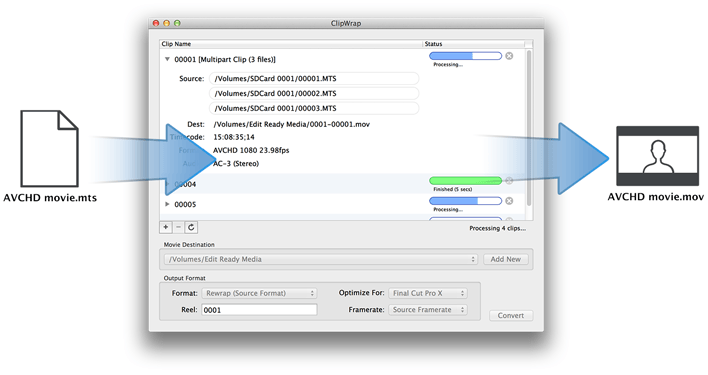
ClipWrap supports large files that have been split due to file size limitations, which is common with harddisk recorders or AVCHD cameras. If you have footage that has been split, ClipWrap automatically detects these spanned clips and will recombine them into a single seamless QuickTime movie.
How long does it take to re-wrap a file?
While wrapping a file, ClipWrap doesn't alter the video data in any way and the speed of conversion is nearly as fast as a file copy. On the other hand, transcoding of your m2t files may take longer based on your destination file type.
Does ClipWrap maintain the original timecode?
Yes. The original video data of the camera acquired clip remains intact. ClipWrap simply places this video data within a QuickTime container so it can be read natively in any QuickTime-compatible application.
Does ClipWrap transcode the footage?
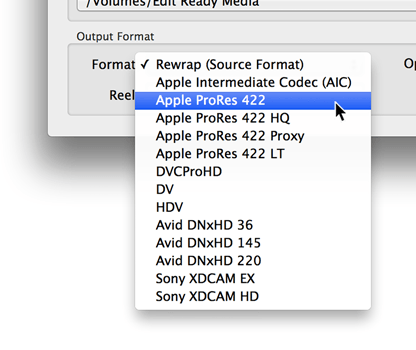
Not by default. In addition to re-wrapping, ClipWrap 1.1 now also supports transcoding. You can transcode your HDV footage into Apple ProRes, Apple Intermediate Codec, DVCProHD, or Avid's DNxHD. You can also down convert to DV.
Can I playback ClipWrap movies in Windows applications?
You can use ClipWrap to transcode those files to ProRes or Avid DNxHD. Both have Windows playback codecs that can be d/l for free and installed:

http://support.apple.com/downloads/Apple_ProRes_QuickTime_Decoder_1_0_for_Windows
http://avid.custkb.com/avid/app/selfservice/search.jsp?DocId=263545

To playback HDV rewrapped files, you'll need to purchase an HDV codec from Calibrated:
http://www.calibratedsoftware.com/QXD.asp
Why do my rewrapped HDV movies have no video?
If your rewrapped movie play back only audio with a black video frame, there are a few possible reasons. If your source files were HDV (.m2t) then you most likely are missing a HDV playback codec. You can HDV codec support by installing Final Cut Studio, or the Qmaster render node that comes with your FCS install DVD.

If you don't have Final Cut Studio, you can try either of these 3rd party HDV codecs:
http://www.discretecosine.com/perian_for_pro/
http://www.calibratedsoftware.com/QXD.asp
Why do my rewrapped AVCHD movies have no video/ stutter/ look funny?
AVCHD cameras are constantly evolving with new products entering the market monthly. The possibility of unsupported cameras and computer configurations is unavoidable. That said, we've encountered a few issues enough times to document them here.

Some rewrapped clips are playing back with stuttering or smearing video when users have Perian or avc1Decoder.component installed on their system. Try uninstallign all third party AVC or h264 playback components.

Some users with newer laptops supporting hardware accelerated h264 playback have problems with black frames or stuttering of some clips in Apple's QuickTime Player 10. Try playing back the same clip in another QuickTime application such as QTPlayer 7.

Frequently Asked Question - App Store versus Direct Sales

ClipWrap is now available in the Mac App Store, in addition to being available directly from our website. If you're an existing user interested in migrating to the App Store version, or are unsure where to go to buy, the FAQ below should help.

I've already purchased ClipWrap from you directly, how does App Store availability impact me?
The Mac App Store is heavily integrated into OS X and makes managing your app purchases, reinstalling on new machines, and upgrading seamless and pain-free. Some users are trying to consolidate application purchases through the App Store to make their computer easier to maintain.
I've already purchased ClipWrap. How with this change affect me?
You are free to continue to use the non-app store version. It will continue to auto-update as before. If you need to re-install the application on a new machine, or after a reformat, you can download from our website and reenter your key as you have in the past.
When I go to the App Store, why doesn't it list ClipWrap as installed like other applications?
Your computer sees App Store-purchased ClipWrap and direct-purchased ClipWrap as two different applications. The app store will only update and manage ClipWrap if you purchased in the App Store. Otherwise you will need to continue to manage the app and updates yourself.
Is there any difference between buying direct and buying from the App Store?
There are a few small differences. Because of Apple's sandboxing requirements, the App Store version of ClipWrap cannot be run from the command line. In addition, the two versions of the app save separate preferences and destination folders. Application updates will be released on slightly different schedules as well - updates are held by the App Store until reviewed and approved by Apple, so you may receive direct sale updates sooner.